Case Study
Imagine that you are tasked with creating a 2D graphics application. A description of what this application must do includes the following text:
The application must draw a picture. A picture is composed of 2D shapes such as circles, rectangles, etc, which can have different positions, sizes and colours.
Analysis of this text suggests Picture, Shape, Circle and Rectangle
as candidate classes, with position, size and colour as attributes and ‘draw’
as the key operation, but that leaves us with several questions to answer:
- How do the classes relate to each other?
- Where do we put those attributes?
- How can the classes work together to support drawing of the picture?
Initial Solution
One possible solution is to have Circle and Rectangle inheriting from
Shape. The Shape class can supply the two properties commmon to all kinds
of shape: position (specified via \( x \) and \( y \) coordinates) and
colour. Subclasses can then add further properties to specify the size of a
shape in an appropriate way (e.g., radius for Circle, width & height for
Rectangle), as well as a draw() method that handles the specifics
of shape drawing.
A picture is essentially a collection of shapes, so the relationship between
Picture and Shape is one of aggregation or composition. The Picture
class can use a collection type such as a mutable list to implement this
relationship. If list contents are specified to be of type Shape then we
will be able to add instances of Circle, Rectangle or any other subclass
of Shape to the collection.
Here’s the structure of this solution, depicted as a class diagram:
classDiagram
  Shape <|-- Circle
  Shape <|-- Rectangle
  Picture o-- "0..*" Shape
  class Shape {
    x: Int
    y: Int
    col: Color
  }
  class Circle {
    radius: Int
    draw(context: Graphics2D)
  }
  class Rectangle {
    width: Int
    height: Int
    draw(context: Graphics2D)
  }
  class Picture {
    add(shape: Shape)
    draw(context: Graphics2D)
  }
We assume that this application is running on the JVM and using features
of the Java standard library to handle graphics. Color is a Java class for
representing colours, and Graphics2D represents a ‘graphics context’, into
which we can draw anything want.
The application will somehow create a Picture object and then invoke its
draw() method to draw the picture. This, in turn, will need to invoke the
draw() methods of all the shapes stored in its list. How should it do this?
Here’s a complete implementation of Picture, showing how draw() might
do its work:
import java.awt.Graphics2D

class Picture {
    private val shapes = mutableListOf<Shape>()

    fun add(shape: Shape) = shapes.add(shape)

    fun draw(context: Graphics2D) = shapes.forEach { shape ->
        when {
            shape is Circle -> shape.draw(context)
            shape is Rectangle -> shape.draw(context)
        }
    }
}
Focus here on the body of the draw() method. This iterates over the list of
shapes, taking each object and checking its type. Kotlin’s smart casting
feature ensures that, on a successful check for a particular type, the object
can subsequently be treated as an instance of that type.
Thus, when we reach the code shape.draw(context) in the first branch of the
when expression, shape is known to be a Circle object, and the version
of draw() from Circle is invoked.
Similarly, when we reach the code shape.draw(context) in the second branch
of the when expression, shape is known to be a Rectangle object, and
the version of draw() from Rectangle is invoked.
This is not a good way of implementing the Picture class!
Consider what happens if we want to draw triangles. We will need a Triangle
class, inheriting from Shape, but we will also need to add a new branch
to the when expression in the draw() method:
shape is Triangle -> shape.draw(context)
We will need to do something similar each time that we add a new kind of shape to the application.
Task 15.4.1
You won’t be able to carry out this task in a Codespace!
Clone your repository to your own PC or a SoCS lab machine and do the task there instead.
Note: this restriction also applies to subsequent tasks involving other versions of this graphics application (e.g., Task 15.4.2 below).
-
The
tasks/task15_4_1subdirectory of your repository is an Amper project containing the complete code for our initial solution. -
Examine the source code files in the
srcsubdirectory of the project. Focus your attention on the filesShape.kt,Circle.kt,Rectangle.ktandPicture.kt. (You can examine the other files if you are interested, but this isn’t necessary.) -
Build and run the application with
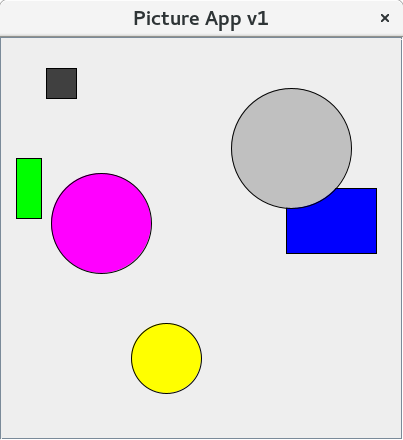
./amper runYou should see a window appear on screen, containing several circles and rectangles of different colours.
Polymorphic Solution
The problem with the initial version our graphics application is that draw()
is defined only in the subclasses Circle and Rectangle. Consequently, we
need Kotlin to ‘smart cast’ an object reference retrieved from the list of
shapes into either a Circle reference or a Rectangle reference, before
attempting to invoke draw().
Additional type checking will be needed in the draw() method of Picture
every time that we add support for a new kind of shape.
The fix for this issue is fairly simple. We start by defining a draw() method
in Shape, making it open for overriding:
open class Shape(val x: Int, val y: Int, val col: Color) {
    open fun draw(context: Graphics2D) {
        // nothing to do here
    }
}
The implementation of draw() in Shape is empty, because the information
on what to draw is contain in subclasses of Shape, rather than Shape
itself.1
The draw() methods in Circle and Rectangle now need to declare that
they are overriding the version inherited from Shape:
override fun draw(context: Graphics2D) {
    ...
}
The draw() method in Picture can then be simplified to
fun draw(context: Graphics2D) = shapes.forEach {
    it.draw(context)
}
The compiler can cope with this simpler implementation because Shape has
a draw() method, but the version of draw() that is invoked at run time
will be the one that is appropriate to the object actually being
referenced. This is dynamic binding in action.
This version of the draw() method does not need to be altered if we add
new types of shape to the application.
We describe code like this as polymorphic, meaning that it will work
with many different types of object (any subclass of Shape), exhibiting
varying behaviour as a result, without ever needing to be aware of the
specific type of object that it is manipulating.
Task 15.4.2
-
The
tasks/task15_4_2subdirectory of your repository is an Amper project containing the complete code for the polymorphic solution.Examine the source code files in the
srcsubdirectory of the project. Focus your attention on the filesShape.kt,Circle.kt,Rectangle.ktandPicture.kt. Compare these files with the versions fromtask15_4_1. -
Build and run the application with
./amper run -
Examine
Triangle.kt. This is a new subclass ofShape, to represent triangles. Currently, it is not used in the application. -
Edit
Main.ktand uncomment the line that adds aTriangleobject to the picture. Save the file, then rebuild and rerun the application. You should now see a small red triangle in the picture.Notice that you didn’t need to make any changes to the
Pictureclass in order for this to happen.